MD339 Digital watch face
Matteo Dini MD ® Watch FacesPersonalization
4.452.00 Reviews
- Version
- Varies With Device
- Installs
- 10.00K
- Age Rating
- Everyone
Screenshots
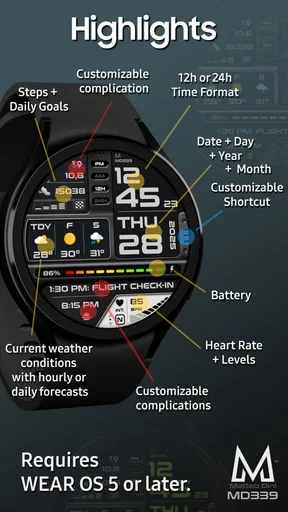
Our Review of MD339 Digital watch face
 Analysis by Appyee
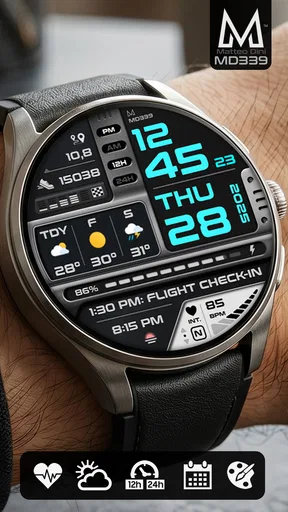
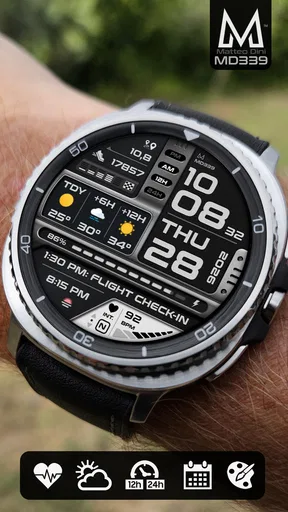
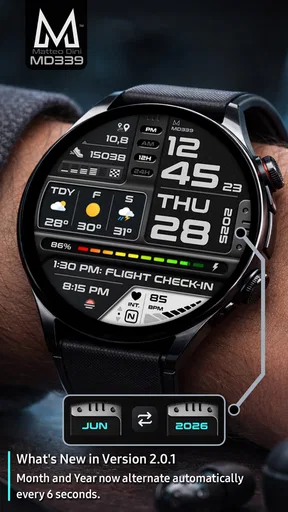
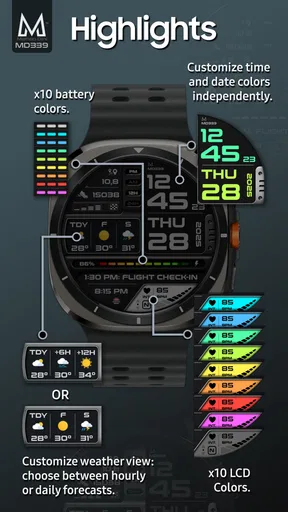
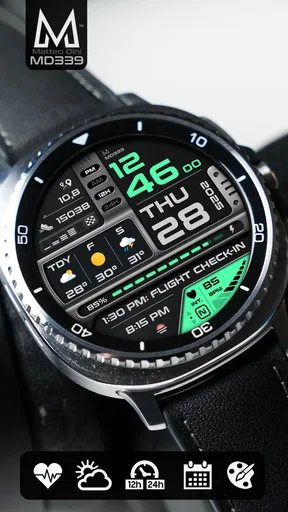
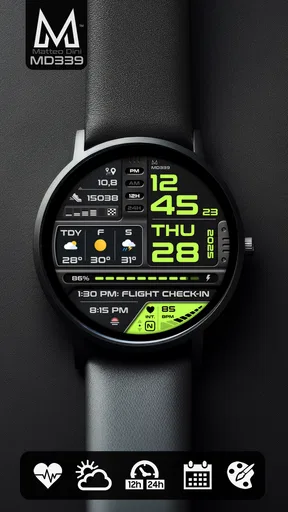
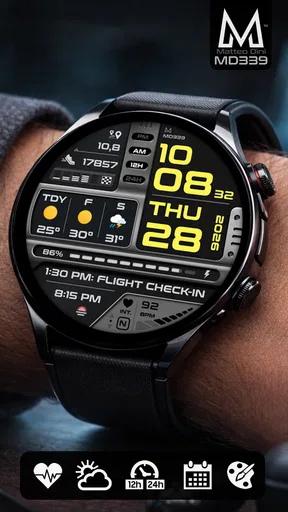
Choosing a watch face is more personal than it first appears. I can live with a plain digital layout for weeks, then suddenly realize that I am checking my watch several times a day and still not seeing the information I actually need. MD339 Digital is aimed at that problem: it turns the watch screen into a compact information panel, with weather, health data and complications arranged for quick checks rather than decoration alone.
I reviewed it as a personalization app for people who want their smartwatch to feel more useful without constantly opening separate apps. It is made by Matteo Dini MD ® Watch Faces and costs $2.99, so the decision is fairly simple: you are paying for a focused watch-face design, not a large app ecosystem. That makes the details of the layout, readability and daily convenience much more important than a long feature checklist.
What to consider before choosing this watch face
My first test with any digital watch face is not how impressive it looks in a screenshot. I want to know whether I can read the time while walking, whether the secondary information is arranged logically, and whether the design remains useful when I am in a hurry. MD339 Digital makes sense if you prefer information density over a minimalist screen.
The central question is how often you want to glance at your wrist for more than the time. If weather conditions, health figures and configurable complications are part of your normal routine, placing them on one screen can reduce the need to move between screens. If you only want large digits and a calm, uncluttered appearance, this design may feel busier than necessary.
I also look at how much effort a watch face demands after installation. A good one should not require constant adjustment just to become practical. With this design, the useful approach is to decide which information you genuinely check, then give those elements priority. Filling every available area with data can make the face less legible, especially when several small fields compete for attention.
That is an important trade-off with an advanced digital face. More complications can mean more convenience, but only when the layout still works at a glance. I would begin with the time, weather and one or two health-related fields, then add anything else gradually. This creates a cleaner starting point than trying to use every space immediately.
Reading the screen in everyday situations
My most realistic use case is a morning commute. I can check the time, see whether the weather has changed, and glance at a health metric without taking out my phone. That sounds minor, but the value comes from repetition: small checks during a day become easier when the information is already visible on the watch.
The same arrangement is useful before leaving home. Instead of opening a weather app and then returning to the watch, I can use the face as a quick prompt. It is not a replacement for a detailed forecast, but it is convenient for deciding whether I need to prepare for changing conditions before heading outside.
Health data works in a similar way. A watch face can make personal tracking more visible, which may encourage a more consistent glance at daily progress. I would not treat those figures as medical guidance, and I would avoid turning every wrist check into a judgment about my day. The strength here is visibility, not diagnosis.
Where MD339 Digital is strongest
The clearest advantage is the balance between a traditional digital time display and a dashboard-like collection of information. Many basic digital faces stop at time, date and perhaps a single extra field. MD339 Digital is more ambitious: it is designed for people who want the watch face itself to carry useful context.
That makes it especially appealing to users who dislike repeatedly opening menus. A weather indicator can answer a quick practical question, while health data can keep a personal routine in view. Complications add another layer of flexibility because they can connect the face with information you already use on the watch.
The real strength is glanceable information, not visual novelty. I would choose it for a smartwatch that I use as a small daily tool, rather than for a device that mainly serves as a clock or accessory. The design has a purpose, and that purpose is making several kinds of information available with less friction.
Another positive is that the face belongs to a recognizable specialist category. Matteo Dini MD ® Watch Faces focuses on watch-face design, and that matters when the product is judged as a layout rather than as a general-purpose utility. The listed average is 4.4 from around 430 ratings, with over 50 written reviews, while the app has reached over 10 thousand installs. Those figures suggest an established level of interest without making the product feel like an anonymous experiment.
Practical ways to set it up
I would treat the first setup as an editing exercise. Start by identifying the three pieces of information you check most often. For one person that might be weather, steps and battery; for another it could be date, calendar and a health reading. The best result will depend on your routine, so copying someone else’s arrangement may not be ideal.
A useful trick is to reserve the most readable areas for information that changes frequently. Static details can occupy less prominent positions, while weather or health data deserves a place that can be read without concentrating. This is more effective than arranging fields according to what looks symmetrical in a preview.
I would also test the face in motion, not only while sitting indoors. A screen that looks excellent in a still image may be harder to interpret while walking or when the watch is viewed briefly. Check it in daylight, during a normal commute and when your attention is divided. That process reveals whether the information density is helping or slowing you down.
There is another subtle trade-off: complications are useful only when their source data updates reliably and remains meaningful to you. If a field is rarely used, it becomes visual noise. Removing an unnecessary complication can make the whole face feel faster, even though the underlying design has not changed.
Where a simpler alternative may fit better
MD339 Digital is not automatically the best choice for every smartwatch owner. Someone who wants a large, quiet clock display may prefer a minimalist digital face. A person who values decorative artwork or an analog look may also find this approach too functional. The design is built around information, so its appeal depends on whether information is your priority.
It may also be the wrong fit if you dislike spending time arranging complications. A more basic alternative can be better when you want to install a face and leave it alone. That kind of face may offer fewer glanceable details, but it can feel more relaxed and easier to read.
There is a difference between wanting data available and wanting data visible all the time. If you prefer to keep health tracking private or out of sight during the day, a face centered on those details may not match your habits. In that situation, using a simpler face and opening health information only when needed gives you more control over what appears at a glance.
People who need highly specialized information should also compare the available complication options on their particular watch before committing. The concept is flexible, but the usefulness of any complication depends on what the watch platform can display and how well that information fits the available space. I would check the preview and test the fields I care about before making it my permanent face.
What the price means in practice
At $2.99, MD339 Digital sits in the paid-watch-face part of the personalization market. I see that as a reasonable purchase when I expect to use the face every day, because the value comes from repeated convenience rather than from installing it once and forgetting it.
The cost is harder to justify if I regularly change watch faces or enjoy experimenting with several designs. In that case, a free option may be enough, particularly if I only need a clock and date. Paying for this one makes more sense when its weather, health and complication-focused layout replaces several small checks during my routine.
The cost of switching is not only financial. Changing from a familiar face means relearning where information sits, deciding which fields belong on the screen and accepting a short adjustment period. I would avoid changing it immediately before an important trip or a busy week. Give yourself enough ordinary time to discover whether the layout actually improves your habits.
There is also a practical reason to keep the old face available as a fallback. If I decide that the screen feels too dense on a particular day, switching back temporarily can confirm whether the issue is the design or simply poor field selection. That comparison is more useful than judging the face after a few minutes of setup.
Who will get the most from it
I would recommend it to smartwatch owners who want a digital face with a practical dashboard feel. It suits people who check the weather before going out, monitor everyday health information and use complications as shortcuts. It is particularly appealing when the watch is already part of a routine and the goal is to make that routine more efficient.
It is also a good match for someone who has outgrown a basic face but does not want a completely decorative redesign. The transition is familiar: the time remains central, while additional information becomes easier to reach. That makes it less of a visual makeover and more of a change in how the watch is used.
I would be more cautious about recommending it to a user who wants maximum simplicity, large uncluttered digits or a strong artistic style. Those priorities point toward a different category of watch face. I would also skip it if I rarely look at weather or health information, because the main benefit would then be wasted screen space.
A balanced look at daily friction
The main limitation is the same feature that makes the face attractive: information density. A dashboard can become distracting when every field is treated as equally important. The answer is careful customization, but that means the best experience may require more thought than a very simple alternative.
Another point is that the face should complement, not replace, the watch’s dedicated apps. Weather details, health history and other deeper information still belong in their full interfaces. MD339 Digital is strongest as a fast summary. Expecting it to provide the depth of those apps would lead to disappointment.
I also would not choose it purely because the store summary mentions advanced functions. The real question is whether those functions match your day. A face can be technically capable and still be wrong for someone who prefers a clean display. In my view, the purchase is justified by a specific routine, not by the word “advanced” alone.
My recommendation after using it
MD339 Digital is a focused paid personalization app that makes the most sense when a smartwatch is used as an information tool. I like its emphasis on weather, health data and complications because those are the details that can turn a quick glance into a useful decision. It feels more purposeful than a face chosen only for appearance.
The app is rated for Everyone, and its release on Aug 20, 2025 places it among newer options for people exploring current watch-face designs. I would still make the decision based on personal habits rather than novelty. A newer face is not automatically better if a simpler design already gives you everything you need.
My advice is to buy it if you can name at least two or three pieces of information you want visible throughout the day and you are comfortable spending a little time arranging them. Start with a restrained layout, test it during real activities and remove anything you do not check. That workflow gives the design its best chance to feel helpful rather than crowded.
If your priority is a calm clock, a decorative style or a zero-setup experience, choose a simpler alternative instead. For everyone else, this is a sensible choice when convenience comes from seeing more at a glance. I would recommend MD339 Digital to practical smartwatch users, while reminding them that its success depends less on filling the screen and more on selecting only the information that genuinely earns its place.
Verdict
Strengths of MD339 Digital watch face
- Clean digital layout makes the time easy to read at a glance.
- Supports useful complications for quick access to health and weather data.
- Modern design suits both casual and sporty smartwatch styles.
- Low visual clutter keeps the watch face looking organized.
- Customization options help match the face to different watch bands.
Limitations of MD339 Digital watch face
- Some features may depend on the smartwatch model or Wear OS version.
- The digital style may feel too simple for users who prefer classic watch faces.
- Bright colors or complications can increase screen distraction.
- Setup may require adjusting several elements before it looks right.
- Battery impact can vary depending on refresh rates and active complications.
Other Releases by Matteo Dini MD ® Watch Faces
View All
MD242 Hybrid watch face
Personalization4.5

MD307 Digital watch face
Personalization4.4

MD326 3D Modern Watch Face
Personalization4.6

MD170B Digital watch face
Personalization4.6
Similar Picks in This Category
View All
Microsoft SwiftKey AI Keyboard
SwiftKey4.3

Wallpapers
Google LLC4.1

Zedge™ Wallpapers & Ringtones
Zedge4.7

Yandex Browser with Alice AI
Direct Cursus Computer Systems Trading LLC4.3

Ringtone Maker:create ringtone
Big Bang Inc.4.7

Fonts Keyboard
Fonts Keyboard3.9
Frequently Asked Questions
What is MD339 Digital watch face?
MD339 Digital watch face is a customizable digital-style watch face designed for compatible Wear OS smartwatches. It focuses on clear time presentation while typically offering additional information such as the date, battery level, steps, heart rate, or other configurable complications. The exact appearance and available functions can vary depending on your watch model, Wear OS version, and the companion installation process.
Which smartwatches are compatible with MD339 Digital watch face?
Compatibility depends mainly on whether your smartwatch runs a supported version of Wear OS. Before downloading, check the Google Play listing and your watch’s supported applications, because not every Android-based wearable is compatible. Devices using proprietary systems, including many fitness bands and non-Wear OS watches, may not be able to install or display MD339 Digital watch face correctly.
Can I customize the MD339 Digital watch face?
The available customization options depend on the version installed and the watch platform. In general, users should check whether they can change colors, digital layouts, background styles, displayed complications, or shortcuts to applications. Some settings may be adjusted from the watch itself, while others require the companion phone application. Certain features may also be limited by the specific watch model.
Does MD339 Digital watch face affect battery life?
Like any active watch face, MD339 Digital watch face can have some effect on battery consumption, especially when it uses animated elements, frequent updates, sensors, complications, or an always-on display. The impact is usually influenced more by your smartwatch settings than by the design alone. Disabling unnecessary complications and reducing always-on brightness may help extend everyday battery life.
How do I install and use MD339 Digital watch face?
Install MD339 Digital watch face through the official store listing on your compatible Wear OS smartwatch or connected Android phone, then select it from the watch-face menu. If it does not appear immediately, synchronize the watch, confirm that the same Google account is being used, and restart the device. Permissions may be requested for complications such as activity or health information.
